APEX Client Update (v2.3.1.19) - CLIENT UPDATE ISSUES - Resolved
**07/28/2026 6:15 PM - RESOLVED - CLIENT UPDATE ISSUES **
We have deployed a hotfix for the upgrade issue. All clients will upgrade again in the morning. Any client that was stuck wilshould now be able to launch after upgrading automatically again and any users who had not upgraded should upgrade automatically to the latest version with n launch issues.
Please make sure you are using the latest client (2.2.9705.2704) when logging into APEX.

If you have any questions or concerns, please contact our Technical Director, Greg Dapkus greg.dapkus@CeRTNAca.gov
If you need immediate assistance, please call 657-216-1400.
**07/27/2026 1:12 PM - CLIENT UPDATE ISSUES**
We have identified the root cause of the Upgrade failure and we are working on a hotfix to aadress the issue.
In the mean time, if you have a client that has upgraded and will no longer run We also have a much quicker workaround to get the client running.
We again apologize for any inconvenience this may cause. Please contact us if you have any concerns or issues.
**07/27/2026 07:36 AM - CLIENT UPDATE ISSUES**
We've become aware that many uusers are experiencing issues with the Automatic client update. The update runs as expected, but then the client will not launch.
At this time the only wrkaround we have is to reinstall the client.
We apologize for any inconvenience this may cause.
CeRTNA will be deploying an APEX update this weekend. (7/25/2026 - 7/26/2026)
*** Please be sure to close your APEX client at the end of your workday on Friday 7/24/2026. ***
This deployment includes the following updates:
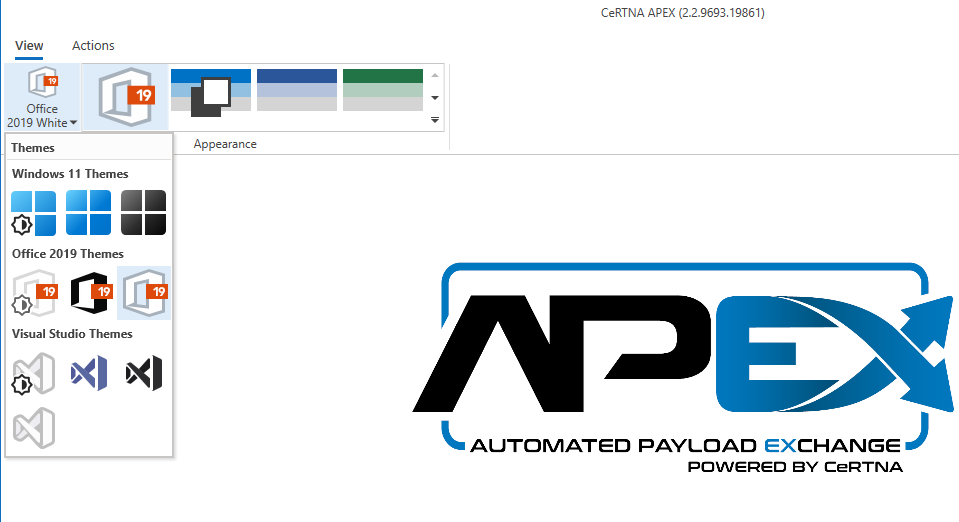
- Themes Update:
- New Theme Selection Menu
- Color preferences available in some themes
- Removed old and redundant themes to reduce client size
- Dark Theme corrections so all text is readable.
- Tyler Auto-Rejection supression
- Counties using Tyler Eagle Recorder can now supress invalid Auto-Rejections
- Contact Greg Dapkus for more information
- Email Template Updates
- Client download reduced by 60%: 408MB -> 164MB
- Bug Fixes:
- MOU/COi Update view and date validation fixes
- Submitter view fixes
- Manual submiter creation now working as expected
We’ll send out an e-mail once the update is finished and the post-deployment testing is completed successfully.
**07/26/2026 10:32 PM - Completed**
The APEX update has been completed on the ERDS & G2G platforms and post-deployment testing was successful.
If you have any questions or concerns, please contact our Technical Director, Greg Dapkus greg.dapkus@CeRTNAca.gov
If you need immediate assistance, please call 657-216-1400.